Modern lists in Power Pages are now Generally Available (GA). They look clean and load much faster than classic lists out of the box. But in real-world portal projects, default grid views don’t always cover what you need.
You might want to style priority fields as status badges, hide specific rows based on status codes, change column headers, or show extra record details when someone clicks a row.
In the past, doing this meant writing jQuery scripts to manipulate HTML elements directly. Now, with the official Power Pages Client API (Microsoft.PowerPages.onPagesClientApiReady), Microsoft gives us supported JavaScript objects and events to customize modern lists cleanly.
What You Can Do with the Client API
The Client API gives you fine-grained control over list containers, columns, rows, and cells. See some possibilities below:
List-Level Controls (IList)
- Check list type: Use list.isModern to verify whether the list is modern before running custom scripts.
- Control visibility: Show or hide an entire list dynamically using list.setVisible(true/false).
- Access the container: Get the raw HTML element using list.getHtmlElement() so you can place custom elements (like a details panel) right around the table.
Column Controls (IColumn)
- Rename headers: Change column header text dynamically with column.setHeader(‘New Title’).
- Set tooltips: Add header tooltips using column.setTooltip(‘Help text’) for better accessibility.
- Hide columns: Toggle column visibility on the fly using column.setVisible(false).
Row Controls (IRow)
- Read record data: Read raw Dataverse values using row.getValue(‘schema_name’) or formatted strings using row.getDisplayValue(‘schema_name’).
- Check permissions & status: Inspect evaluated server privileges (canWrite, canDelete) using row.getPrivileges(), or read stateCode and statusCode using row.getState().
- Style and filter rows: Add or remove CSS classes (addClassName, removeClassName), set inline styles (setStyle), or hide specific rows (setVisible(false)).
Cell Controls (ICell)
- Override text: Change display text in a cell using cell.setDisplayText(‘Friendly Value’) without altering underlying Dataverse data.
- Apply cell styles: Change font weight, padding, or background colors on individual cells using cell.setStyle(). Change font weight, padding, or background colors on individual cells using cell.setStyle().
List Events
- loaded: Fires after the grid finishes fetching and rendering data (including initial load, sorting, filtering, and paging). This is where you should read row data or apply styling.
- rowclick: Fires when a user clicks a row, giving you the record ID (e.row.getId()).
- cellclick: Fires when a specific cell is clicked (overrides rowclick for that selection).
Practical Example
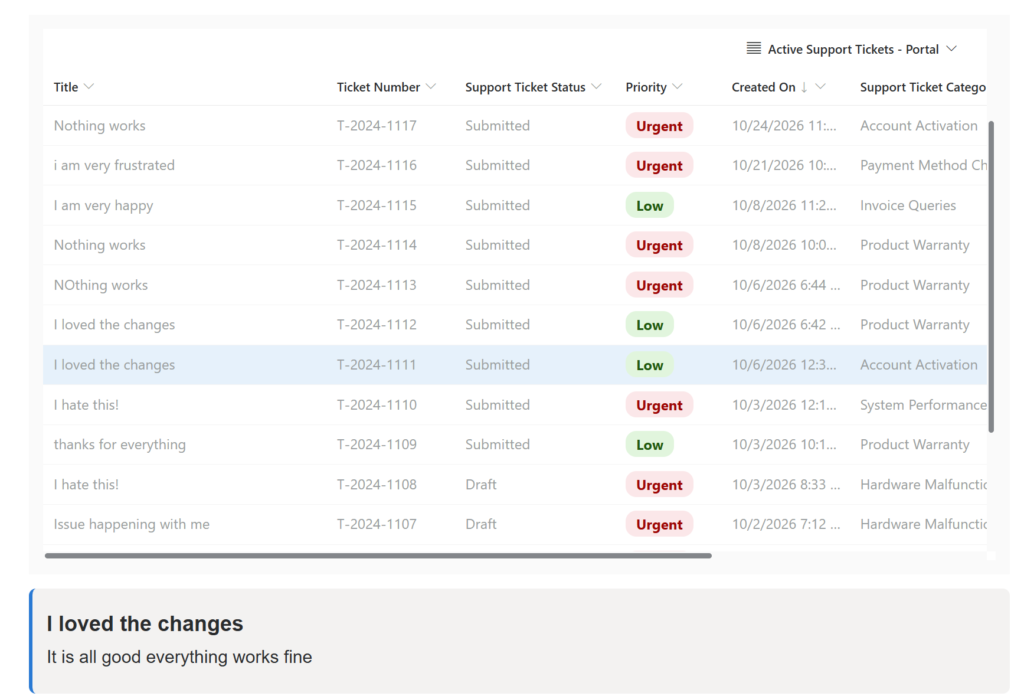
Let’s look at a scenario where we combine these APIs to format choice columns into visual badges, highlight active selections, and display a detail view underneath the grid.
Note: The script below uses a custom Support Tickets list (pnp_supporttickets) from my own setup, featuring schema names like pnp_name, pnp_details, and pnp_priority. You will need to take the core concept and swap out these schema names and option values to match your own Dataverse tables and columns.
This would be used as the Custom JavaScript of the list:
// Helper function to safely call the Power Pages Web API with the verification token
function safeAjax(options) {
    if (window.webapi && window.webapi.safeAjax) { return window.webapi.safeAjax(options); }
    const deferred = $.Deferred();
    shell.getTokenDeferred().done(function (token) {
        options.headers = Object.assign({}, options.headers, { "__RequestVerificationToken": token });
        $.ajax(options).done(deferred.resolve).fail(deferred.reject);
    }).fail(function () { deferred.rejectWith(this, arguments); });
    return deferred.promise();
}

// Customize Modern Lists via the Power Pages Client API
Microsoft.PowerPages.onPagesClientApiReady(async function ($pages) {
    // 1. Find the modern list on the current page
    const list = $pages.currentPage.lists.getAll().find(l => l.isModern);
    if (!list) { return; }

    let panel = null;
    let selectedTicketId = null;

    // 2. Inject a custom CSS class for row highlighting
    if (!document.getElementById("selected-row-style")) {
        $("<style id='selected-row-style'></style>").text(
            ".selected-row, .selected-row > * { background-color: #e5f1fb !important; }" +
            ".selected-row { box-shadow: inset 3px 0 0 #0078d4 !important; }"
        ).appendTo(document.head);
    }

    function highlightSelectedRow() {
        list.rows.forEach((row) => {
            if (row.getId() === selectedTicketId) {
                row.addClassName("selected-row");
            } else {
                row.removeClassName("selected-row");
            }
        });
    }

    // Helper to build or reuse a panel container directly below the list
    function getPanel() {
        if (!panel || !panel.closest("body").length) {
            panel = $("<div class='ticket-details-panel'></div>").css({
                margin: "16px 0",
                padding: "16px",
                background: "#f3f2f1",
                borderRadius: "8px",
                borderLeft: "4px solid #0078d4"
            });
            $(list.getHtmlElement()).after(panel);
        }
        return panel;
    }

    // 3. Handle row selection: highlight row and fetch record details
    list.on('rowclick', async (e) => {
        const ticketId = e.row.getId();
        selectedTicketId = ticketId;
        highlightSelectedRow();

        const targetPanel = getPanel();
        targetPanel.empty().append($("<p class='text-muted'></p>").text("Loading details..."));

        try {
            // Fetch extra record fields via Web API
            const ticket = await safeAjax({
                type: "GET",
                url: "/_api/pnp_supporttickets(" + encodeURIComponent(ticketId) + ")?$select=pnp_name,pnp_details",
                contentType: "application/json"
            });

            if (selectedTicketId === ticketId) {
                targetPanel.empty().append(
                    $("<h4></h4>").text(ticket.pnp_name || "Ticket Details"),
                    $("<p></p>").text(ticket.pnp_details || "No details provided for this ticket.")
                );
            }
        } catch (err) {
            console.error("Could not load details", err);
            if (selectedTicketId === ticketId) {
                targetPanel.empty().append($("<p class='text-danger'></p>").text("Could not load ticket details."));
            }
        }
    });

    // Map choice column values to badge styles (Replace these integer values with your choice values)
    const priorityStyles = {
        192350000: { backgroundColor: '#fde7e9', color: '#a80000' }, // High
        192350001: { backgroundColor: '#fff4ce', color: '#8a5a00' }, // Medium
        192350002: { backgroundColor: '#e5f1fb', color: '#004578' }, // Low
        192350003: { backgroundColor: '#dff6dd', color: '#0e5a0e' }  // Routine
    };

    // 4. Format cells and set tooltips when data finishes loading
    list.on('loaded', () => {
        highlightSelectedRow();

        const titleColumn = list.getColumn('pnp_name');
        if (titleColumn) {
            titleColumn.setTooltip('Select a row to view full details below');
        }

        list.rows.forEach((row) => {
            const badgeStyle = priorityStyles[row.getValue('pnp_priority')];
            if (badgeStyle) {
                row.getCell('pnp_priority')?.setStyle({
                    ...badgeStyle,
                    fontWeight: 'bold',
                    padding: '4px 12px',
                    borderRadius: '12px',
                    width: 'fit-content',
                    lineHeight: '1.4'
                });
            }
        });
    });
});
Results
We get a color coded list based on the priority of the items, plus when selecting a row we can see their details being loaded below the list:
Reference