If you have recently spun up a new Power Pages environment and found your previously custom JavaScript suddenly failing, you are likely facing red Content Security Policy (CSP) errors in your browser console.
Usually, the errors look something like this:
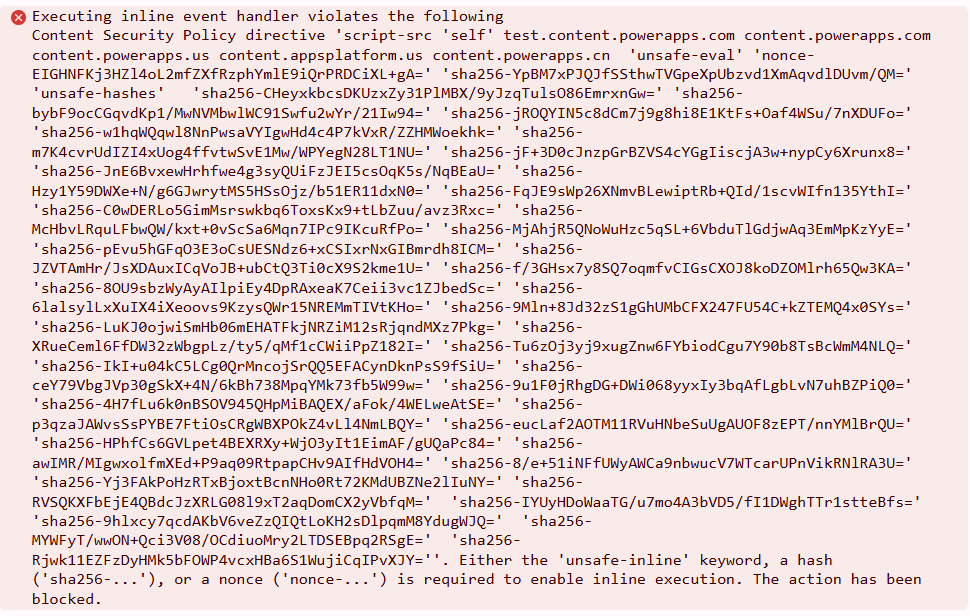
Here is a quick breakdown of why this is happening and the exact Site Setting value you need to fix it.
The Problem: The November Security Update
Microsoft recently tightened the baseline security for Power Pages. For environments provisioned after November 2025, a strict Content Security Policy is now enabled by default.
This new baseline heavily restricts inline scripts, relies on cryptographic nonces for out-of-the-box Microsoft scripts, and blocks eval() operations. If your custom code uses jQuery to manipulate form DOM elements (like .html(), .append() or .wrap()), it inadvertently strips the security nonce off the hidden Microsoft form scripts, causing the browser to block them instantly.
The Trap: Blanking the Setting Doesn’t Work
The official instruction from Microsoft to turn this off is to just go into the Portal/Pages Management app, add a HTTP/Content-Security-Policy Site Setting with a clear value to turn it off.
However, leaving this setting blank doesn’t seem to work.
The Solution: Explicitly Override the Policy
Since having a blank policy does not seem to take effect, the solution was to overwrite it with a custom string that explicitly permits inline execution and evaluation.
In the Portal Management App, go to Site Settings, find HTTP/Content-Security-Policy (or create it if it doesn’t exist), and paste this exact string as the value:
script-src * 'unsafe-inline' 'unsafe-eval' 'self' content.powerapps.com content.powerapps.us content.appsplatform.us content.powerapps.cn; style-src 'unsafe-inline' https:;
Why this works:
- *: Allows scripts to load from any external source.
- ‘unsafe-inline’: Allows your custom inline scripts and event handlers to execute.
- ‘unsafe-eval‘: Permits jQuery and Webpack to dynamically parse and execute components (fixing the Uncaught EvalError ).
- No ‘nonce‘: We explicitly removed the ‘nonce’ keyword from the Microsoft default. If a nonce is present anywhere in the policy, modern browsers will completely ignore ‘unsafe-inline’, putting you right back where you started.
Note: While this gets you unblocked and fixes the immediate rendering issues, using wildcards and unsafe-inline does bypass standard XSS protections. Use this to get your site functional, but always validate your inputs and custom code!
References