In my last post, we looked at how to use the new Custom access type in Power Pages to secure reference data (like ticket categories) using a basic FetchXML filter. But what if you need to go a step further?
Imagine a scenario where you want to show users their own support tickets, but you also want to apply a specific filter, for example, showing only their “Payment Issues” tickets for that user.
If you use the standard “Contact” access type, you can easily show users their own tickets, but you can’t easily filter out the other categories at the security layer. If you use the “Custom access” type to filter by category, how do you dynamically pass the logged-in user’s ID to the query?
Enhanced Authorisation
When you enable Enhanced Authorization on your site (which is needed for custom table permissions), Power Pages maps your portal user (the Contact record) directly to a System User record inside Dataverse. When your portal user requests data, the system essentially impersonates that System User.
Because the request runs as that mapped System User, Dataverse knows exactly who is asking for the data. We can use this to our advantage in FetchXML.
The Solution: The eq-userid Token
To filter records by a specific category and limit them to the current logged-in user, we can write a FetchXML query that links our tables together and uses a dynamic token.
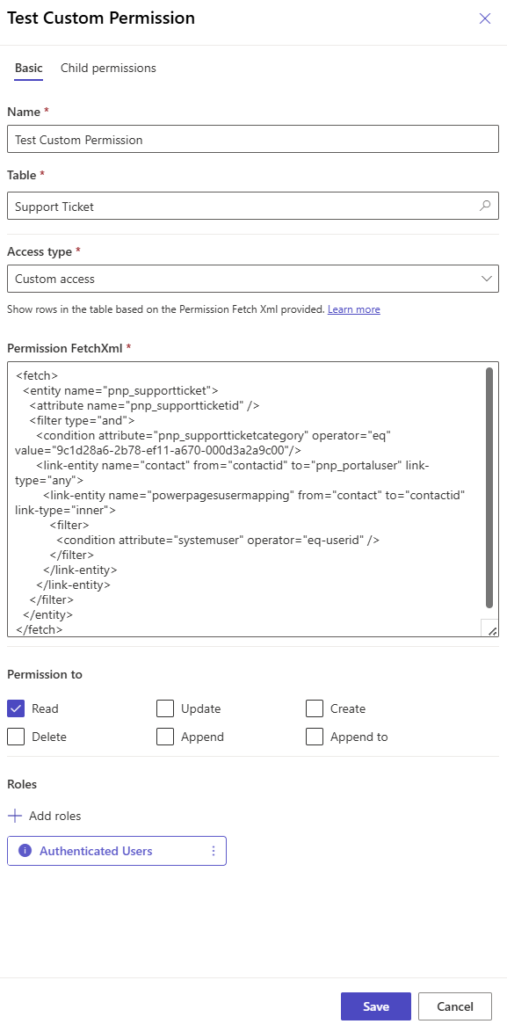
Here is a sample FetchXML you can use in your Custom Table Permission:
<fetch>
  <entity name="pnp_supportticket">
    <attribute name="pnp_supportticketid" />
    <filter type="and">
      <!-- 1. Filter by the specific category (e.g., Payment Issues) -->
      <condition attribute="pnp_supportticketcategory" operator="eq" value="9c1d28a6-2b78-ef11-a670-000d3a2a9c00"/>

      <!-- 2. Link the ticket to the portal Contact -->
      <link-entity name="contact" from="contactid" to="pnp_portaluser" link-type="any">

        <!-- 3. Link the Contact to the internal mapping table -->
        <link-entity name="powerpagesusermapping" from="contact" to="contactid" link-type="inner">
          <filter>
              <!-- 4. The dynamic filter for the current user -->
              <condition attribute="systemuser" operator="eq-userid" />
            </filter>
        </link-entity>
     </link-entity>
    </filter>
  </entity>
</fetch>
Breaking down the query
Here is what is happening in the code above:
The Category Filter: First, we do a standard check to make sure the pnp_supportticketcategory matches the specific GUID of our Payment category.
Linking to the Contact: Next, we join the ticket table to the contact table using the lookup column on the ticket (pnp_portaluser).
Linking to the Mapping Table: This is where the magic happens. We join the contact table to a system table called powerpagesusermapping. This is the table that connects portal contacts to Dataverse system users.
The Dynamic Token: Finally, we use the filter. Because of the new authorization architecture we talked about earlier, Dataverse sees the eq-userid operator, looks at the System User making the request, and injects their ID automatically.
Wrapping Up
By linking to the powerpagesusermapping table and using the eq-userid operator, you can build custom table permissions using the current user ID in the filters.
References